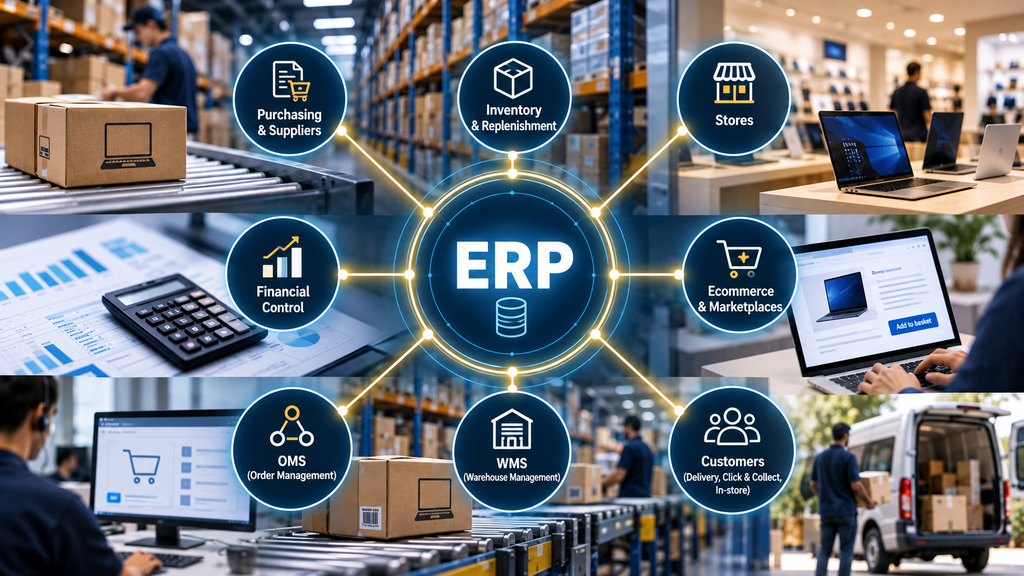
An Enterprise Resource Planning (ERP) system plays a central role in keeping a retail business running. From purchasing products and maintaining inventory records to managing supplier payments and financial reporting, ERP helps connect the essential processes behind day-to-day operations.
Consider a retailer operating number of physical stores and multiple distribution centres. Its buying team purchases products from suppliers, warehouses receive and distribute inventory, stores serve customers, and the finance team manages payments and financial reporting. ERP helps connect the operational and financial records supporting these activities.
Over time, the retailer expands into ecommerce, mobile apps and marketplaces. A laptop can now be purchased online for home delivery, collected from a store, or ordered through a marketplace and fulfilled through the retailer’s distribution network. Each transaction creates inventory movements and financial activities that must be recorded accurately, regardless of where the sale originated.
As the business becomes more omnichannel, ERP must work alongside specialist systems responsible for order fulfilment, warehouse operations and customer transactions. These systems perform different functions, but they depend on reliable information moving between them.
If an Order Management System (OMS) is the brain coordinating ecommerce fulfilment, ERP can be seen as the heart supporting the wider retail business.
What Does an ERP Actually Do?
Running a retail business involves activities that are closely connected. Purchasing decisions affect inventory, inventory movements affect financial records, and supplier payments depend on what the business has actually received. ERP helps bring these activities together, allowing departments to work with consistent information while maintaining operational and financial control.
Consider a retailer purchasing 500 laptops from a supplier. The purchasing team creates a purchase order for 500 units, but when the delivery arrives, the warehouse receives only 480. The supplier still sends an invoice for all 500.
The ERP helps compare three important records:
| Record | Quantity |
| Purchase Order | 500 laptops |
| Goods Receipt | 480 laptops |
| Supplier Invoice | 500 laptops |
This process is commonly known as three-way matching. The difference of 20 laptops must be investigated before the unmatched amount is approved for payment. The supplier may deliver the remaining units, issue a credit note or agree another resolution.
ERP supports this process by connecting purchasing, goods receipt and financial records. Without reliable controls, the retailer risks paying for products it has not received or recording inventory that does not physically exist.
Accurate product information is equally important. Before a retailer can purchase, receive or sell a product, it needs reliable master data, including SKU identifiers, units of measure, supplier details and relevant financial attributes. Incorrect information can create problems across purchasing, inventory and financial reporting. Depending on the retailer’s technology architecture, this information may be maintained in ERP or shared with specialist systems such as Product Information Management (PIM).
Not every retailer uses ERP for exactly the same functions. Some rely on specialist systems for purchasing, inventory or supplier management, with ERP maintaining core business records and financial controls.
How ERP Supports Traditional Retail
ERP plays an important role in connecting purchasing, inventory distribution and financial control across a retail network. Buying products is only the beginning; the business must also ensure inventory reaches the right stores and every movement is recorded accurately.
Consider a retailer purchasing 1,000 laptops from a supplier. The products arrive at a distribution centre, where the quantities received are recorded. The next challenge is deciding how many laptops each store should receive.
A store selling five laptops per day may require more inventory than one selling three. However, sales volume alone does not determine replenishment requirements. Existing stock matters too.
| Store A | Store B | |
| Daily sales | 5 | 3 |
| Current stock | 60 | 6 |
| Target stock cover | 14 days | 14 days |
| Additional stock required | 10 | 36 |
Although Store A sells more laptops, Store B needs a larger replenishment because it has significantly less inventory relative to demand.
The retailer defines replenishment rules based on sales, available stock, lead times and target stock cover. ERP or a specialist replenishment system can support these calculations and generate stock transfer requirements.
As products move from distribution centres to stores, ERP maintains or receives the relevant inventory movement records. When a laptop is sold, the retailer must also reflect the reduction in inventory and the corresponding financial transactions.
This is how ERP supports traditional retail: connecting purchasing, inventory movements and financial control across the business.
What Changes When Retail Becomes Omnichannel?
Omnichannel retail places greater demands on the accuracy and availability of inventory information. ERP continues to support the underlying inventory records, but those records must now serve multiple sales channels and integrate reliably with systems managing real-time availability.
A laptop sitting in a store could be purchased by a walk-in customer, reserved for Click & Collect or allocated to an online delivery order. The retailer must decide how much inventory to make available across channels without compromising customer promises.
Stock Reservation and Protection
Consider Store B from our earlier example. It has 42 laptops and sells an average of three per day. With replenishment taking three days, the retailer decides to protect nine units for walk-in customers, leaving 33 potentially available online.
| Inventory position | Units |
| Physical store stock | 42 |
| Protected for walk-in customers | 9 |
| Remaining stock | 33 |
The retailer may introduce an additional safety threshold of two units to account for stock discrepancies or delays in inventory updates, reducing online availability to 31 laptops.
Stock protection alone is not enough. When an online customer places an order, the inventory must be reserved immediately to prevent the same available unit from being sold through another channel. If the order is cancelled before picking begins, the reservation can normally be released automatically. If picking has already started, confirmation may be needed before making the stock available again.
Depending on the technology architecture, an OMS or specialist inventory service manages channel availability and reservations, while ERP maintains or receives the underlying inventory records and relevant stock movements.
Reliable ERP inventory data provides an essential foundation for stock availability decisions, while the business defines how inventory should be shared across channels.
Connecting ERP With OMS, WMS and Other Systems
ERP does not operate in isolation. As retail operations become more complex, it must exchange information with specialist systems that manage different parts of the customer journey. The OMS coordinates order fulfilment, while the Warehouse Management System (WMS) manages physical warehouse activities such as picking, packing and dispatch. ERP supports the related inventory, purchasing and financial records.
Consider a customer purchasing a laptop through the retailer’s website. The ecommerce platform captures the order, the OMS determines which warehouse should fulfil it, and the WMS manages the warehouse activities required to prepare it for delivery. Throughout this process, ERP must receive the relevant inventory and financial updates to maintain accurate business records.
What Happens When a Product Is Damaged?
Suppose the warehouse team discovers that the laptop is damaged during picking. The WMS records the exception and prevents the damaged unit from being fulfilled, while the OMS checks whether another warehouse or store can fulfil the customer order.
If an alternative location is available, the OMS can reallocate the order according to the retailer’s fulfilment rules. Meanwhile, ERP must receive the relevant inventory adjustment and financial information associated with the damaged product.
The customer order and damaged inventory are separate business records requiring different actions. The WMS manages the physical warehouse exception, the OMS coordinates the customer order, and ERP supports the underlying operational and financial records.
Recorded Sales vs Delivered Sales
ERP also plays an important role in distinguishing ecommerce trading performance from financial revenue recognition.
Consider a customer purchasing a laptop online value of 2,000 on 29 September. The payment is successful, and the ecommerce team records the transaction as an order sale. However, the laptop is not delivered until 2 October.
From a trading perspective, the sale was recorded in September. For financial reporting, the timing may be different. If the retailer recognises revenue when control of the product transfers upon delivery, the transaction belongs to the fourth quarter rather than the third, even though payment was received before September ended.
Revenue recognition is only one part of the financial picture. ERP also supports accounting for the cost of goods sold, changes in inventory value and applicable taxes. For example, when a laptop is sold and delivered, the retailer must record not only the revenue but also the cost of the product and the corresponding reduction in inventory value. These records help the business understand its financial performance beyond the value of orders received.
This distinction becomes particularly important towards the end of a financial reporting period. A retailer may have strong order sales, but orders awaiting delivery may not yet qualify as recognised revenue.
The OMS tracks the order through fulfilment, while ERP supports the financial accounting and ensures revenue is recognised according to the retailer’s accounting policies.
An order can be commercially successful before it is recognised as revenue in the financial accounts.
When Things Go Wrong: Why Reconciliation Matters
ERP depends on accurate information from connected systems. Even when a customer order is successfully fulfilled, missing or incorrect updates can leave the retailer with inconsistent inventory and financial records.
Consider a customer who orders a laptop online and receives it as promised. The OMS shows the order as completed, but an integration failure prevents the fulfilment information from reaching ERP. The customer experience appears unaffected, yet the retailer may have incorrect inventory records, incomplete financial information or missing links to the product’s serial number in the relevant systems. These discrepancies can create complications during returns, warranty claims and financial reporting.
What Is Reconciliation?
Reconciliation is the process of comparing records between systems to identify and resolve differences. For example, if the OMS reports 10,000 completed orders but only 9,950 corresponding transactions are correctly reflected in ERP, the retailer needs to investigate the remaining 50. Some may have failed during integration, while others could be delayed, duplicated or recorded under different statuses.
ERP plays an important role in financial and operational reconciliation, supported by integration monitoring and exception-handling processes. Failed transactions should be retried where appropriate, and unresolved discrepancies escalated for investigation. The same principles apply to supplier invoices, inventory transfers, payments and refunds.
A successful customer delivery does not necessarily mean the underlying business transaction has been completed correctly.
Measuring ERP Performance and Business Impact
The value of ERP should not be measured simply by system availability. What matters is whether the retailer can rely on accurate business records, consistent processes and effective financial controls.
- Inventory Record Accuracy: How closely recorded inventory matches physical stock across stores and warehouses.
- Transaction Reconciliation Success Rate: The proportion of relevant transactions successfully reconciled across connected systems and financial records.
- Cancellation and Return Processing Accuracy: Whether cancellations and returns result in correct inventory adjustments, refunds and accounting updates.
These measures become particularly important at scale. Consider a retailer processing 100,000 transactions per day with a reconciliation success rate of 98%. Although the percentage may appear strong, it means 2,000 transactions require further reconciliation or investigation every day. The business must therefore monitor not only the success rate but also how quickly exceptions are resolved and how many remain outstanding.
Other useful measures include purchase order processing efficiency, supplier invoice matching and inventory adjustment accuracy. Performance depends on the reliability of business processes and integrations across multiple systems, not ERP alone.
The commercial value of ERP comes from reliable business records, stronger financial control and fewer operational errors requiring manual intervention.
Final Thoughts: The Heart of Retail Operations
As retailers expand from physical stores into ecommerce, mobile apps and marketplaces, ERP remains central to maintaining accurate business records and financial control. Purchasing, inventory movements, supplier payments and financial transactions must continue to work reliably, even as the number of channels and connected systems grows.
However, ERP does not manage every aspect of retail operations. Its responsibilities vary depending on the retailer’s technology architecture, with specialist systems such as OMS, WMS and POS handling specific functions. What matters is how effectively these systems work together, supported by accurate data, clear business processes, well-defined responsibilities and reliable integrations.
Omnichannel growth creates new opportunities, but those opportunities depend on the strength of the business operations supporting them. ERP plays a central role in making that possible.