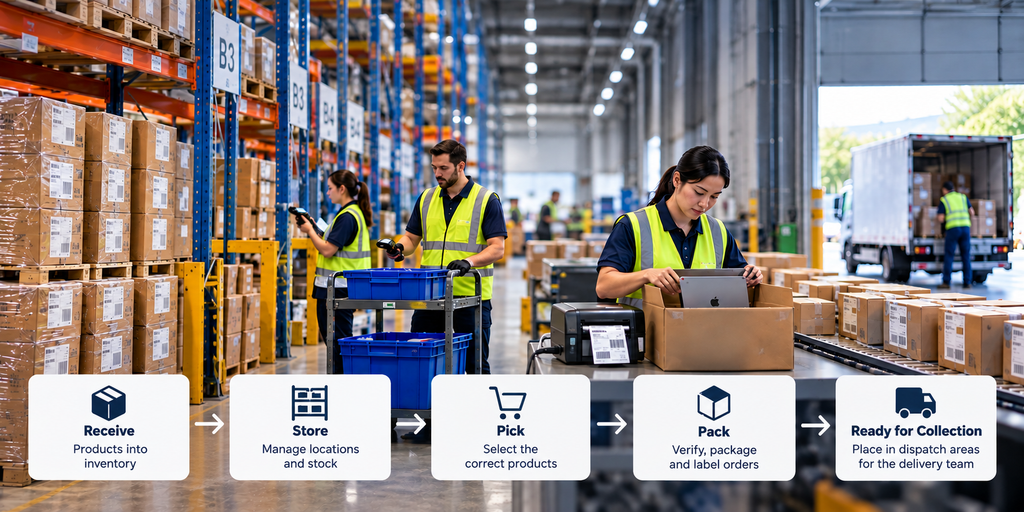
A customer places an order for a laptop on a retailer’s website. The order is confirmed, and the customer expects it to arrive within the promised delivery time. But before the delivery team can collect the package, someone needs to locate the laptop inside the warehouse, pick the correct product, verify it, pack it and prepare it for dispatch.
This is where a Warehouse Management System (WMS) comes in.
Consider a retailer operating multiple physical stores and distribution centres alongside an ecommerce website, mobile app and marketplace channels. Its warehouses receive products from suppliers, replenish stores and fulfil online customer orders. The WMS manages the physical warehouse activities involved, from receiving and storing inventory to preparing orders for collection.
The OMS coordinates fulfilment, while the WMS manages the physical warehouse operations that make it possible.
What Does a WMS Actually Do?
A WMS manages the day-to-day movement of products through the warehouse, from receiving supplier deliveries to preparing customer orders for dispatch.
Consider our retailer expecting 500 laptops from a supplier. When the shipment arrives, warehouse staff discover that only 480 have been delivered. The WMS records the actual quantity received and flags the 20-unit discrepancy for investigation. The receiving information can then be shared with ERP to support purchasing and supplier reconciliation.
The next step is putaway: moving received products into suitable storage locations. Based on configured rules such as available space, product characteristics and picking frequency, the WMS can recommend where products should be stored. Fast-moving laptops, for example, may be placed in easily accessible locations to reduce unnecessary movement during picking.
When an online order arrives, the WMS creates or releases picking tasks and guides operators to the correct storage locations. Barcode scanning helps verify that the right product has been selected. Once picked, the laptop moves through packing and preparation for dispatch.
Throughout these activities, the WMS records inventory movements and order-processing updates, sharing relevant information with connected systems.
Inventory Accuracy: Knowing Exactly Where Products Are
Knowing that a distribution centre holds 1,000 laptops is useful, but warehouse teams also need to know where those laptops are stored and whether they are available for fulfilment.
A WMS maintains inventory records at the storage-location level. Products may be held in reserve storage, picking shelves or designated areas for damaged and returned goods. Warehouse operators scan products and locations as inventory moves, while regular cycle counts help identify differences between recorded quantities and physical stock.
Inventory status matters too. If 20 of the 1,000 laptops are damaged and another 30 are quarantined for inspection, only 950 are available for fulfilment.
Physical Warehouses vs Virtual Warehouses
Retailers may use virtual warehouses to manage inventory allocations without physically separating products.
Consider the 950 available laptops allocated across three sales channels:
| Virtual warehouse | Laptops |
| Retail stores | 500 |
| Ecommerce | 300 |
| Marketplaces | 150 |
| Total | 950 |
If ecommerce sells through its allocation while marketplace stock remains available, the website may show the product as unavailable even though laptops remain physically in the distribution centre. The retailer can rebalance these allocations without moving the products.
Virtual warehouses can also support operational separation, such as inventory reserved for particular fulfilment activities. Depending on the retailer’s architecture, these logical allocations may be managed in WMS, ERP, OMS or a specialist inventory system.
Barcode Scanning and Serial Number Tracking
For high-value electronics, tracking quantities alone is not enough. Laptops of the same model share a SKU, but each device has a unique manufacturer serial number.
During receiving, picking or packing, operators may scan serial numbers to track individual devices. For example, a laptop with serial number SN-ABC12345 may be associated with customer order ORD-10025.
The point at which this association is confirmed varies by retailer. It may happen during picking, packing or dispatch, with the information retained in WMS or another connected system.
This traceability supports warranty claims, returns and investigations into missing or incorrect products.
Picking and Packing: Where WMS Creates Efficiency
Once the OMS allocates an order to a distribution centre, the WMS helps warehouse teams organise the work required to prepare it for dispatch.
Consider our retailer receiving 1,000 laptop orders during a major sales event. Processing each order individually could mean warehouse operators repeatedly travelling between the same storage locations. A WMS can reduce unnecessary movement by grouping orders, organising picking routes and assigning tasks based on the warehouse setup.
Picking Waves: Balancing Efficiency and Delivery Promises
One common approach is wave picking, where orders are grouped for processing based on factors such as delivery priority, carrier collection times and available warehouse capacity.
Rather than processing all 1,000 orders together, the retailer may run multiple picking waves throughout the day. Orders requiring earlier carrier collection can be prioritised, while later orders are included in subsequent waves.
Warehouses may also use batch picking, where an operator collects products for several orders in one trip, or zone picking, where operators work within designated warehouse areas. These approaches can be combined depending on the operation.
The retailer defines its fulfilment priorities, while the WMS helps warehouse teams execute them efficiently.
From Picking to Packing
When an operator picks a laptop, barcode scanning helps verify that the correct SKU has been selected. The product then moves to packing, where it is checked, securely packaged and prepared for transport.
The warehouse team prints and attaches the appropriate shipping label, which typically includes delivery information, an order reference and a barcode for tracking or handover.
Once packed and labelled, the order is moved to a designated dispatch or staging area. Packages may be organised by delivery partner, route or scheduled collection time so they can be located and handed over efficiently.
The WMS records relevant fulfilment milestones and shares updates with connected systems. An order being ready for collection is distinct from its physical collection by the delivery team, which is recorded as a separate milestone where supported.
Connecting WMS With OMS: Cut-Off Times, Capacity and Delivery Promises
Having a product in stock does not necessarily mean a retailer can deliver it within the promised time. Different delivery options, including standard, next-day, same-day and express delivery, place different demands on warehouse operations.
Consider our retailer offering same-day delivery for laptop orders placed before 2 PM. A customer ordering at 1:30 PM may qualify, but only if the distribution centre has sufficient capacity to prepare the order before the delivery team’s collection deadline.
The OMS, or a connected delivery promise engine, determines which options can be offered based on the retailer’s business rules. The WMS manages the warehouse activities and provides relevant operational updates.
Why Warehouse Capacity Matters
Imagine a warehouse capable of picking and packing 200 orders per hour. During a major sales event, it receives 350 orders that must be prepared within the same hour. Even with sufficient inventory, the warehouse cannot meet every deadline using its existing capacity.
The retailer may normally accept same-day orders until 2 PM, but available processing capacity could be exhausted by 12:30 PM. If no alternative capacity is available, the website should stop offering same-day delivery rather than continue making promises the operation cannot fulfil.
Where supported, warehouse capacity information can be shared with the OMS or delivery promise engine to adjust the delivery options available to customers.
Different Delivery Methods, Different Priorities
Standard delivery orders may be processed in scheduled picking waves, while same-day and express orders often require greater urgency.
Quick commerce introduces tighter timelines. A 30–60-minute delivery promise may require immediate picking from a nearby store, dark store or local fulfilment location rather than waiting for a scheduled warehouse wave.
For example, a 45-minute delivery promise might involve:
| Activity | Illustrative time |
| Order allocation | 5 minutes |
| Picking and packing | 10 minutes |
| Rider handover | 5 minutes |
| Last-mile delivery | 25 minutes |
| Total | 45 minutes |
Click & Collect presents a similar requirement: if an order is promised ready within one hour, the store must have the capacity and processes to prepare it.
The business defines delivery priorities, cut-offs and capacity rules. The OMS or delivery promise engine determines which options can be offered, while WMS supports warehouse execution. Delivery management systems coordinate collection and transportation.
The objective is to offer delivery promises that warehouse and delivery operations can consistently fulfil.
When Things Go Wrong: Managing Warehouse Exceptions
Even with accurate inventory records, warehouse operations do not always go according to plan. Products may be damaged, missing from their expected locations or incorrectly picked.
Consider a customer ordering a laptop for next-day delivery. The OMS allocates the order to a distribution centre where the product is showing as available. However, when the warehouse operator attempts to pick the laptop, they discover that the unit is damaged.
The operator records the exception in the WMS, and the affected laptop can be moved to a damaged or quarantined inventory status, preventing it from being selected for another order.
If another suitable laptop is available in the same distribution centre, fulfilment may continue with a replacement unit. Otherwise, the OMS may attempt to source the product from another distribution centre or store.
This alternative fulfilment arrangement may affect the original delivery promise. The OMS, or a connected system, may need to recalculate the expected delivery date and communicate any changes to the customer.
The ERP, or another inventory system, receives relevant stock updates to keep inventory records aligned and support any necessary financial adjustments.
The same principle applies when a product cannot be located or an incorrect item is identified during picking. The WMS records the warehouse exception, while connected systems support the required inventory and order adjustments.
Identifying problems early helps prevent incorrect or damaged products from reaching customers and gives the retailer an opportunity to fulfil orders through an alternative route.
Measuring WMS Performance and Business Impact
A WMS should help retailers improve inventory accuracy, warehouse productivity and the ability to prepare customer orders on time. Measuring these outcomes helps identify where warehouse operations are performing well and where improvements are needed.
Five useful KPIs include:
| KPI | What it measures |
| Inventory Accuracy | How closely recorded inventory matches physical stock |
| Picking Accuracy | Percentage of order lines picked correctly |
| Order Processing Time | Time taken to process an order through warehouse fulfilment |
| Orders per Labour Hour | Warehouse productivity relative to labour hours worked |
| On-Time Dispatch Readiness | Percentage of orders packed and ready before their required collection deadline |
These metrics are connected. Poor inventory accuracy can cause delays during picking, while inefficient picking processes can increase processing times and put dispatch deadlines at risk.
Consider our retailer processing 5,000 online orders during a major sales event. If 4,750 orders are packed and ready before their scheduled collection deadlines, its on-time dispatch readiness is 95%.
Understanding the remaining 5% requires investigating the underlying causes. Are operators spending too much time locating products? Are picking waves scheduled effectively? Is packing capacity sufficient during peak periods?
WMS data can help warehouse managers answer these questions and improve operational performance.
Strong warehouse performance contributes to reliable delivery commitments, fewer customer complaints and a better overall shopping experience.
Final Thoughts: From Inventory to Ready for Collection
A Warehouse Management System plays an important role in turning inventory into customer orders ready for dispatch. It helps warehouse teams manage physical operations accurately and efficiently, from receiving supplier deliveries to preparing orders for collection.
As retailers introduce more delivery options, including same-day, express and quick commerce, warehouse execution becomes increasingly important. Having products in stock is not enough. Retailers must also have the capacity and processes to prepare orders within the time promised to customers.
This requires coordination between systems. The OMS determines where orders should be fulfilled and coordinates the fulfilment journey, while the WMS manages the physical warehouse activities needed to prepare those orders.
Ultimately, the warehouse team must ensure that the correct products are picked, verified, packed, labelled and placed in designated dispatch areas, ready for collection by the delivery team within the required time.
That is where warehouse preparation ends and the next stage of the customer journey begins: delivery.